
Text Manipulation
A toolbox of actions for inserting, removing, replacing, and re-casing the values of metadata tags.
The Text Manipulation function offers a variety of ways to transform the values of tags. Choose which tag you would like to manipulate, then select one of the actions below.
Actions
- Insert Text At Beginning
- Insert your own text at the beginning of the selected tag.
- Insert Text At End
- Insert your own text at the end of the selected tag.
- Insert Text At Position
- Insert your own text at any given character position in the selected tag.
- Remove Text At Beginning
- Remove specific text, but only if it occurs at the beginning of a tag's value.
- Remove Text At End
- Remove specific text, but only if it occurs at the end of a tag's value.
- Remove Text
- Remove specific text from anywhere in the tag's value. For example, you could remove all instances of the word "the".
- Remove n Characters From Beginning
- Remove a given number of characters from the beginning of the tag.
- Remove n Characters From End
- Remove a given number of characters from the end of the tag.
- Remove Characters In Range
- Remove all of the characters within a given range. For example, you could delete everything from character 4 through character 8.
- Convert To UPPERCASE
- Convert every character in the selected tag to uppercase.
- Convert To lowercase
- Convert every character in the selected tag to lowercase.
- Convert To Title Case
- Convert the tag to title case. Words like a, an, and the are not capitalized. The list of "small words" that are not capitalized comes from the New York Times Manual of Style.
- Convert To Sentence case
- Capitalize only the first word of every sentence.
- Capitalize Each Word
- Capitalize every word, including small words like a, an, and the.
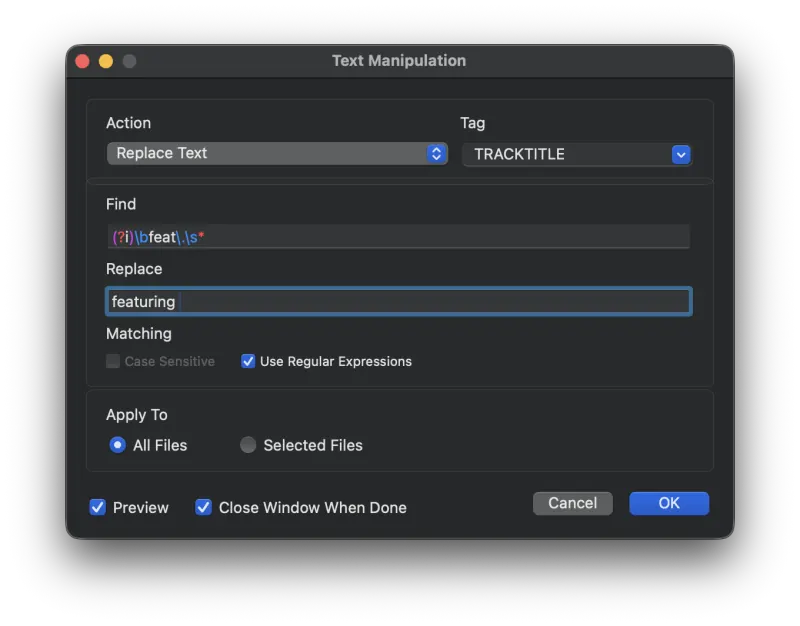
- Replace Text
- Find and replace text. This action also supports regular expressions. See regular-expressions.info for more on regex syntax.
Still need help? Email metadatics@markvapps.com or send a message.