Resize Artwork
Convert album artwork between JPEG and PNG, or shrink it to a new size.
Metadatics can convert and resize album artwork. Access this function by control-clicking on the album artwork pane, or from the Album Artwork panel.
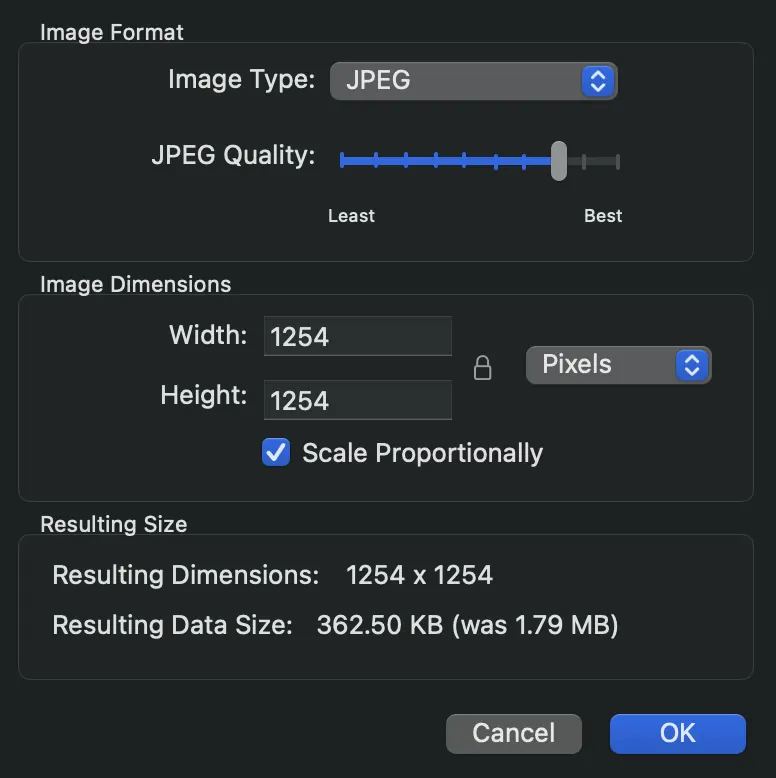
Options Explained
- Image Type
- Choose between converting to JPEG or PNG.
- Quality (JPEG Only)
- Selects the JPEG compression level. Higher quality produces better-looking images but larger file sizes.
- Image Dimensions
- Enter new values for the width and height of the image. To resize by a percentage, choose percent from the pop-up menu.
- Scale Proportionally
- Keep the image's original aspect ratio. When enabled, changing either the width or height updates the other to match.
Still need help? Email metadatics@markvapps.com or send a message.